PC emulation software for gamepads

Xpadder is an emulator application that lets you control your PC keyboard and mouse with a game console. You can sync your keyboard and mouse buttons with your joystick commands. Xpadder is compatible with Microsoft Windows PC computers and laptops on Windows 10, Windows 8, Windows 7, Windows Vista, and Windows XP 32-bit and 64-bit operating systems.

Top Recommended Alternative

Is Xpadder free?

The official version of Xpadder is available for a reasonable one-time payment. There is no subscription model that you will need to renew. If you purchase Xpadder, then you will automatically gain access to the future editions of the gaming utility. You will receive new software updates as they are released when you download and install the app.

Is Xpadder a virus?

Xpadder is a safe program to use on PC devices. While the original tool is free of malware and spyware, there are other sources that provide the software as a free download , but is possibly an attempt to share malware. The developer does not promote a free version.

The official Xpadder platform does not display advertisements. Xpadder provides a distraction-free environment that is ideal to play PC games, listen to music, watch videos, etc.

Does Xpadder work with Xbox One controller?

If you have Xpadder, then you can link your Xbox One controller with your PC computer or laptop to integrate the keyboard and mouse buttons with the controller sticks. Additionally, the emulator can map your keyboard and mouse movements onto Xbox 360 controllers.

Does Xpadder work with PS4 controller?

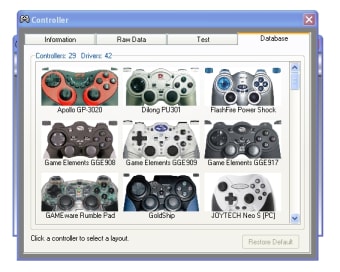
There is a multitude of compatible gamepads that Xpadder can handle. If you have Xpadder, then you can play video games on your PC with a PlayStation 4 controller. Xpadder lets you use older gamepads by PlayStation: Playstation 2, Playstation 3, etc.

How do I use Xpadder for PC games?

You can easily download and install Xpadder. The joystick solution is lightweight and does not take up a lot of storage space on your PC. There is a clean user interface that is filled with features. You will be directed to click on the joypad icon to begin. A context menu will drop down from the gamepad picture.

You can click on ‘New’ beside the blank controller icon to create a layout. A new window will open with fine-tuning options for gamepad support. There are tabs within the bottom portion of the screen: ‘Image’, ‘Sticks’, ‘DPad’, ‘Buttons’, and ‘Triggers’. You can begin by copying and pasting an image of your controller model into the image portion of the UI.

The controller will need to be linked with the PC device. You can mark the box next to the first ‘Enable’ option within the ‘Sticks’ tab to synchronize your handheld equipment with your PC. The software will guide you through a calibration process that has you push the stick in different directions. Xpadder will provide you force feedback after you follow the prompts.

There will be a shaded circle on the page that you can maneuver around the gamepad image. You can configure the other controls by dragging and dropping the circle on top of the different parts of the game controller. You can repeat the process on the other side of the controller by selecting the second ‘Enable’ box. Additionally, the ‘DPad’ segment can be enabled.

You can map the commands within the ‘Buttons’ tab by pressing a button on the gamepad and adding that selection to the chart. The key can move around the chart. You can click on the mapped buttons to delete or rename them. The ‘Triggers’ tab lets you associate the outer buttons on the controller with the software.

How do I use map controller buttons on the keyboard?

You can map your keyboard on the console controller by creating a profile in Xpadder.  Making multiple profiles is a possible option. The notepad icon to the right of the gamepad icon will let you create a new profile to map your full keyboard and mouse onto a joystick. The keyboard and mouse emulation process can be time consuming.

There are websites that let you copy and paste their emulated information into Xpadder. You can click on the note image to open the dropdown menu to press ‘Paste’. The data will automatically upload into the user interface. The profile management system will not automatically save the info.

You can press the save icon that is to the right of the notepad. There are files that you can download from the internet and upload into Xpadder to easily map the controller. If you use a file from a website, then you can tap on the ‘Open’ option under the notepad icon to load the mapped controls.

Is Xpadder worth it?

Xpadder is a popular tool that you can use to link your game controllers with your PC for an affordable price. You can play multiplayer games with multiple controllers at the same time.

It is definitely worth the download. 

Alternative configuration applications

AntiMicro, Controller Companion, DS4Windows, Joy2Key, and reWASD are other PC emulator apps. AntiMicroX offers the most appealing user interface to map your keyboard and mouse controls onto your handheld device. While AntiMicro is free to download, the program requires more technical knowledge than Joy2Key and Xpadder.

DS4Windows is an easy-to-use Windows application that requires a DualShock PlayStation 4 controller. reWASD is a paid software program that is specifically made for Xbox controllers. Controller Companion functions with a variety of joysticks.

A favorite PC emulator

Xpadder is a platform that can configure your game controller and PC together for the best possible user experience. The utility is compatible with an extensive number of gamepads. You can use Xpadder on a Windows OS. You can translate the UI into different languages: English, German, Spanish, etc.

What’s new?

Xpadder receives consistent software updates. You can visit the official website to see their latest update, privacy policy, cookie settings, etc.

  • Pros

    • Lightweight
    • Multiple players
    • Variety of languages
    • Shortcuts available online
    • Compatible with a multitude of gamepads
  • Cons

    • Not cross-platform
 0/1

App specs

  • License

    Free

  • Version

    5.7
  • Latest update

  • Platform

    Windows

  • OS

    Windows 10

  • Language

    English

  • Downloads

    691.1K

    Last month's downloads

    • 616
  • Size

    1.10 MB

  • Developer

Program available in other languages


Icon of program: Xpadder

Xpadder for PC

  • Free
  • 3
    1049
  • 691.1K
  • V5.7

User reviews about Xpadder

3

4 reviews

Add review

Main reviews for you

  • Anonymous user

    This is an awesome program if you want to use console controllers on a PC.. This is an awesome program if you want to use console controllers with your PC. Pros: Lots of optionsSupports almost any controller Cons: Doesn't work on Win8 or 7(?)

  • Anonymous user

    Not compatible with windows7 ?. i tried to download but i clicked on it afterwards and it wouldn't let me open said it wasn't compatible so i went to uninstall it and it didn't show up so i had to delete it manually i first deleted desktop icon then another desktop icon popped up in its place i deleted it then i searched xpl and found a dead link to it that i deleted sounds like a good program no use to me guess i don't need it with win7 Pros: good program very useful Cons: wouldn't support win 7

  • Anonymous user

    Better way to play!. xpadder proved to be a better way to control my avatar in Skyrim as I was able to set it up and cover all major actions in the game. I wanted this program so I could put the game on the projector and enjoy playing is 100" high resolution glory! Without Xpadder I had to have the computer on my lap, and though it is technically a laptop, it weighs over 9lbs., and gets very hot. 17" screens are great, but not if they sit on your lap and burn your legs! Xpadder allows me to play for extended hours w/o discomfort or strain. Easily one of the very best programs to come around in a very long time. Thanks Jonathon! Pros: Allows use of PS3 or Xbox controllers and many others as well on the PC. Play PC games without being forced to crouch over the table and type in every command. Gameplay with Xpadder is the way it should be - natural. Cons: Might not work with every controller ever made.

  • Anonymous user

    Better way to play!. xpadder proved to be a better way to control my avatar in Skyrim as I was able to set it up and cover all major actions in the game. I wanted this program so I could put the game on the projector and enjoy playing is 100" high resolution glory! Without Xpadder I had to have the computer on my lap, and though it is technically a laptop, it weighs over 9lbs., and gets very hot. 17" screens are great, but not if they sit on your lap and burn your legs! Xpadder allows me to play for extended hours w/o discomfort or strain. Easily one of the very best programs to come around in a very long time. Thanks Jonathon! Pros: Allows use of PS3 or Xbox controllers and many others as well on the PC. Play PC games without being forced to crouch over the table and type in every command. Gameplay with Xpadder is the way it should be - natural. Cons: Might not work with every controller ever made.


More

You may also like

Alternatives to Xpadder

Explore Apps

Latest articles

Laws concerning the use of this software vary from country to country. We do not encourage or condone the use of this program if it is in violation of these laws.
Softonic

Is Xpadder safe?

100/100

Score result: Clean

This file passed a comprehensive security scan using VirusTotal technology. It is safe to download.

  • Virus free
  • Spyware free
  • Malware free
  • Verified by Security Partners

    VirusTotal logo

Scan Info

Last scan
Saturday, January 6, 2024
Scan provider
VirusTotal · Full report

File Integrity

File
Xpadder_5.7.7z
SHA256
a32405250c54acc0ab140ac84362c76b1628f6411a89d4f7b63ff5e2411305c5
SHA1
a4333a39efd10d4d0ba5876f91a561c937ba96ab

Softonic security commitment

Xpadder has been thoroughly scanned by our advanced security systems and verified by industry-leading partners. This file comes from the official developer and has passed all our security checks, showing no signs of viruses, malware, or spyware. For more information, visit our Security and Trust Center